About ten minutes, and your pages will not change. By the end you will have moved every setting and every post’s own choices across, and every link anyone has ever shared to a section of your posts will still work.
Why you are seeing a warning
If you open your Plugins screen you may see this under LuckyWP Table of Contents:
This plugin has not been tested with the latest 3 major releases of WordPress.
That is WordPress.org being honest rather than WordPress.org being alarmed. LuckyWP Table of Contents was last updated on 16 April 2025. It has 100,000 users and 885 reviews averaging 4.9 stars, which tells you it was made with care. Nothing about it has broken. The author simply stopped.
That matters less today than it will in a year. WordPress changes, PHP changes, and a plugin nobody is maintaining eventually meets a version of something that it was never written for. Most people would rather move while everything still works than after it stops.
What you would normally lose by moving
Any table of contents plugin can list your headings. The awkward part is the three things you already have:
Your settings. Which levels you list, your minimum, your numbering, your title, your skipped headings. Twenty or thirty decisions you made once and have not thought about since.
Your posts’ own choices. If you have switched the list off on some posts, or given one its own title, that is stored per post. On a site with a few hundred posts, nobody is going through them by hand.
Every link anyone has ever shared. This is the one nobody mentions, and it is the one that costs you.
When a contents list links to a heading, it has to give that heading a name. LuckyWP names them one way: #How_it_works. Most other plugins name them another: #how-it-works. Both work, neither is wrong, and they are not the same.
So the moment you switch to a plugin that names them differently, every link that points into one of your posts stops working. Links in your own posts. Links in your newsletters. Links other sites have made to you. Links somebody put in a forum answer four years ago. They do not break loudly; they just land at the top of the page instead of at the section, and nobody tells you.
What this plugin does about it
It reads LuckyWP’s own settings and copies them, and it keeps LuckyWP’s way of naming headings, so the links keep working.
| What you have | What happens to it |
|---|---|
| Your settings on all five of LuckyWP’s tabs | Copied |
| Your posts’ and pages’ own choices | Copied |
| The way your headings are named | Kept exactly, including the way a repeated heading is numbered |
Your [lwptoc] shortcodes, already in your posts | Still work, once LuckyWP is switched off |
| Your font sizes for the title and the items | Not copied, and the report tells you so. The list takes its type from your theme, which is how it matches the rest of your pages. Three lines of CSS put them back if you want them |
| The show and hide words | Not copied. Here the title itself folds the list, so there are no separate words |
| Anything else it cannot carry | Named in the report, with the reason, before you commit to anything |
Nothing is guessed at. Every one of those rows was read from LuckyWP’s own code rather than from its documentation.
Before you start
Nothing here needs a backup to be safe, because nothing is overwritten that cannot be put back, and LuckyWP itself is never changed or switched off by this plugin. But if you take backups before you change anything on a live site, this is a change on a live site.
The five steps
Plugins, Add New, search for Essence Table of Contents, Install, Activate.
Both plugins being active at once is fine for a few minutes. You may see two contents lists on a post while that is true. That is expected and it goes away at step 4.

Both plugins in the Plugins screen
The tab is called Move from another plugin. It tells you what it can see on your site: which plugin, which version, whether it is still switched on, and how many posts and pages have their own choices.
Nothing has been read yet. The page does not touch your settings until you press the button.
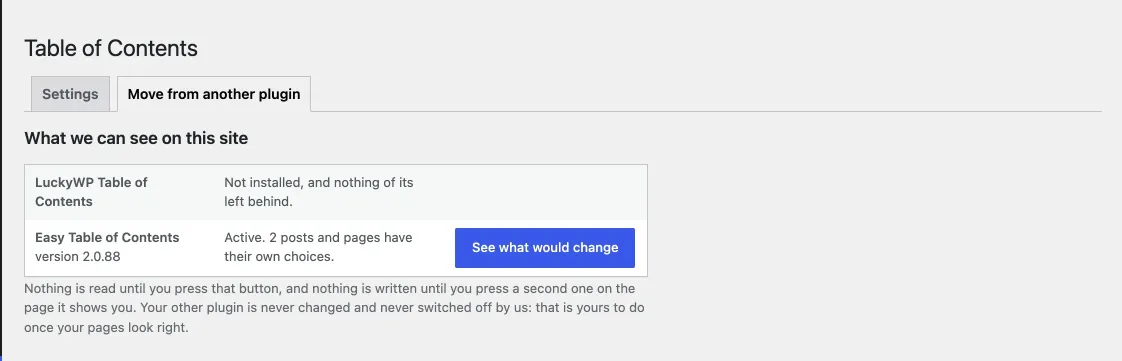
What we found on the site
This reads LuckyWP’s settings and shows you, setting by setting, what each one becomes. Three groups:
- Carried over, with the old value and the new one side by side.
- Changed, where the nearest thing here is not quite the same, with what the difference is.
- Left behind, with the reason.
Underneath, the same for your posts: how many have their own choices, what those choices are, and any that cannot come with them, listed by name so you can go and look.
Nothing has been written at this point. You can close the page and walk away.
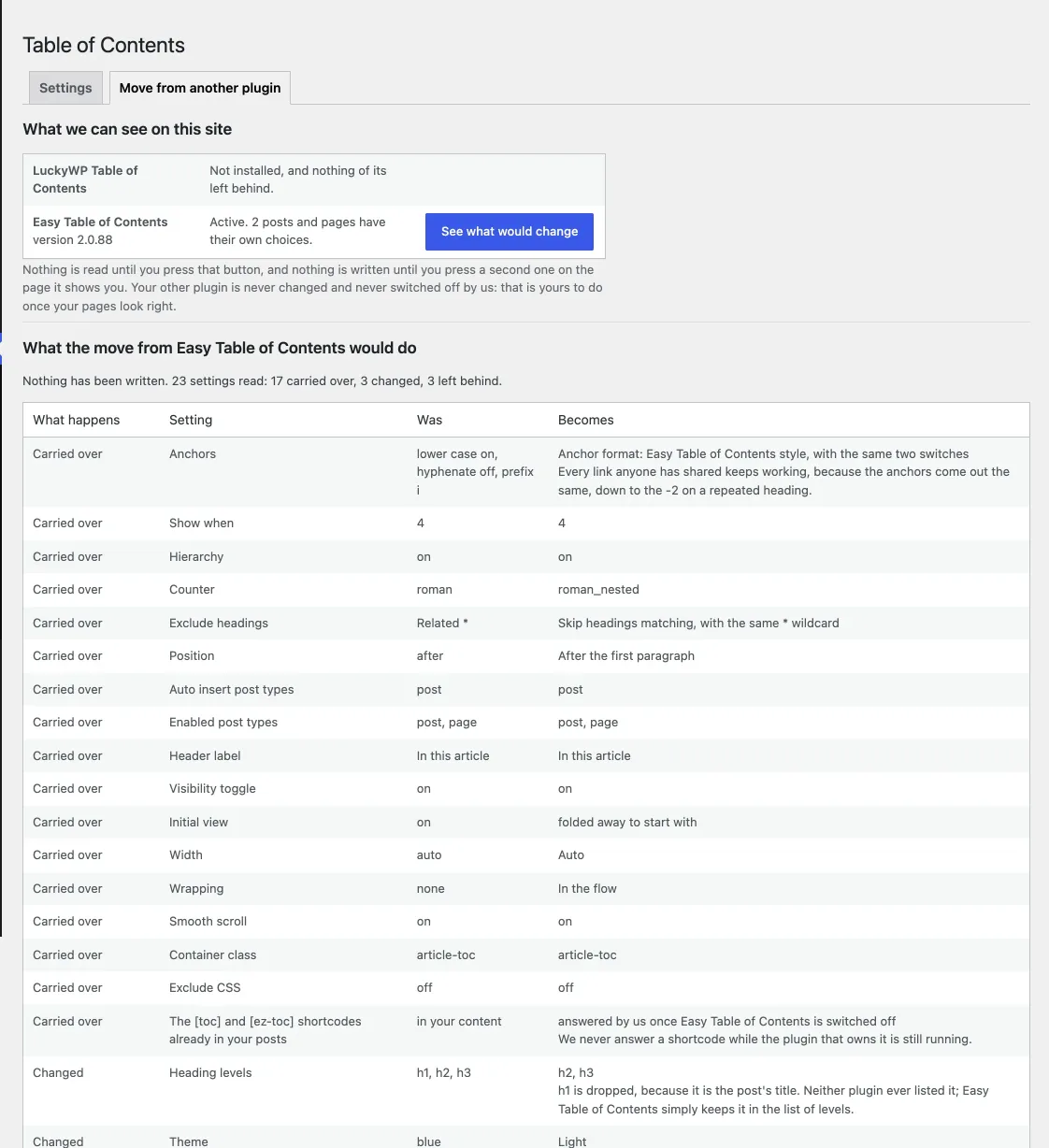
The report
The first button writes the settings and the posts’ choices. A site with thousands of posts does them a few hundred at a time and tells you when there are more to go.
Then switch LuckyWP off yourself, from the Plugins screen. This plugin will not do it for you, and that is deliberate: it is your site, and you should be the one who decides the old plugin’s job is done.
Open two or three of your longest posts. The list should be where it was, saying what it said.
Then the real test: find a link that points at a section of one of your posts — in another post, in an old newsletter, anywhere — and click it. It should land where it always did.
If something is not right
Put it back. The move tab has a button that restores the settings you had before it ran. It is there until you press “Forget this”.
Switch LuckyWP back on. Its settings are exactly as they were; we never touched them. Switch this plugin off and LuckyWP picks up where it left off.
Tell us. The support forum, which opens when the plugin is approved, gets an answer within one working day. If the move got something wrong, that is a bug worth fixing for the next person, so please do say.
Questions people ask
Will my pages look different?
A little, in one way: the box. LuckyWP’s Light and Dark boxes use its greys and ours use ours, so if you had a box it will be a slightly different shade. If you would rather have no box at all, which is what we recommend, set Box to None and the list takes its colours from your theme.
What about the headings themselves?
Untouched. Neither plugin changes your posts. The names are added to the headings when the page is shown, which is why switching between plugins changes nothing in your content.
What if I have Easy Table of Contents as well?
The move tab will show both. Do LuckyWP first; a post that has choices in both keeps LuckyWP’s, because that is the plugin people are moving from.
Can I run the move twice?
Yes. It copies rather than merges, so running it again gives the same result.
Do I have to do this all at once?
No. You can install this plugin, look at the report, and decide another day. Nothing is written until you press the second button.