About ten minutes, and your pages will not change. Every setting and every post’s own choices move across, and every link anyone has ever shared to a section of your posts still works.
Should you move at all?
Probably not, if everything is working. Easy Table of Contents is on 600,000 sites and it is still being updated. If your posts show the list you expect and nobody is complaining, there is no reason to change anything, and we would rather say so than pretend otherwise.
People come looking for an alternative for two reasons, and both are about long posts.
It can run out of memory on a long post. The plugin’s own support forum carries reports of a fatal error on long posts and of the editor running out of memory, and there is a setting in it called “Enable memory fix” that exists because of this. If you write 5,000-word guides and you have seen a white page or a memory message, that is the one.
It is doing more than you need. There is a lot in it: sticky lists, a floating button, AMP support, settings for a dozen other plugins. If you only ever wanted a list of your headings, you are carrying all of it on every page.
This plugin does the one job. It reads your headings in a single pass, which is why long posts are not a problem, and it puts no JavaScript on your pages at all.
If neither of those is your problem, stay where you are.
What a change of plugin does to your links
If you do move, to this plugin or any other, the real risk is not your settings. It is your links.
When a contents list points at a heading, the heading has to be given a name. Easy Table of Contents names them one way. Most other plugins name them another. Both work; they are not the same.
So the moment you switch to a plugin that names them differently, every link that points into one of your posts stops working: links in your own posts, in your newsletters, from other sites, in forum answers written years ago. They do not break loudly. They just land at the top of the page instead of at the section, and nobody tells you.
What this plugin does about it
It reads Easy Table of Contents’ own settings and copies them, and it keeps its way of naming headings, so the links keep working.
| What you have | What happens to it |
|---|---|
| Your settings | Copied, including the lower case and hyphenate switches |
| Your posts’ and pages’ own choices | Copied |
| The way your headings are named | Kept exactly, including the -2 on a repeated heading and what happens to a heading in another alphabet |
Your [toc] and [ez-toc] shortcodes already in posts | Still work, once Easy Table of Contents is switched off |
| h1 in your list of levels | Dropped, because h1 is your post’s title. Neither plugin ever listed it |
| A counter in another alphabet, such as Tamil or Hangul | Becomes plain numbers, and the report names which one you had |
| The sticky list and the floating button | Not copied. A list that follows the reader is what the paid version of this plugin adds; the free one does not have it, and the report says so once |
| The loading method, the memory fix, the anchor-jump fix | Not copied, and not needed. Each of those works round how Easy Table of Contents builds its list. This one reads the post once on the server, so there is nothing to work round |
| Lists on your front page, category and tag pages | Not copied. This plugin works on single posts and pages |
Every row was read from Easy Table of Contents’ own code, not from its documentation.
The five steps
Plugins, Add New, search for Essence Table of Contents, Install, Activate.
Both being active at once is fine for a few minutes. You may see two lists on a post while that is true.
Move from another plugin. It says what it can see: which plugin, which version, whether it is still on, and how many posts have their own choices. Nothing has been read yet.
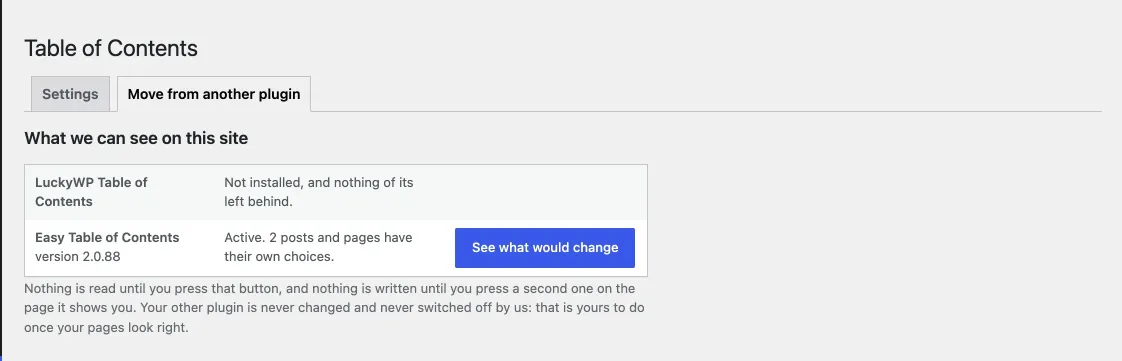
What we found on the site
Setting by setting: carried over, changed, or left behind with the reason. Then the same for your posts.
Nothing is written at this point. You can close the page and think about it.
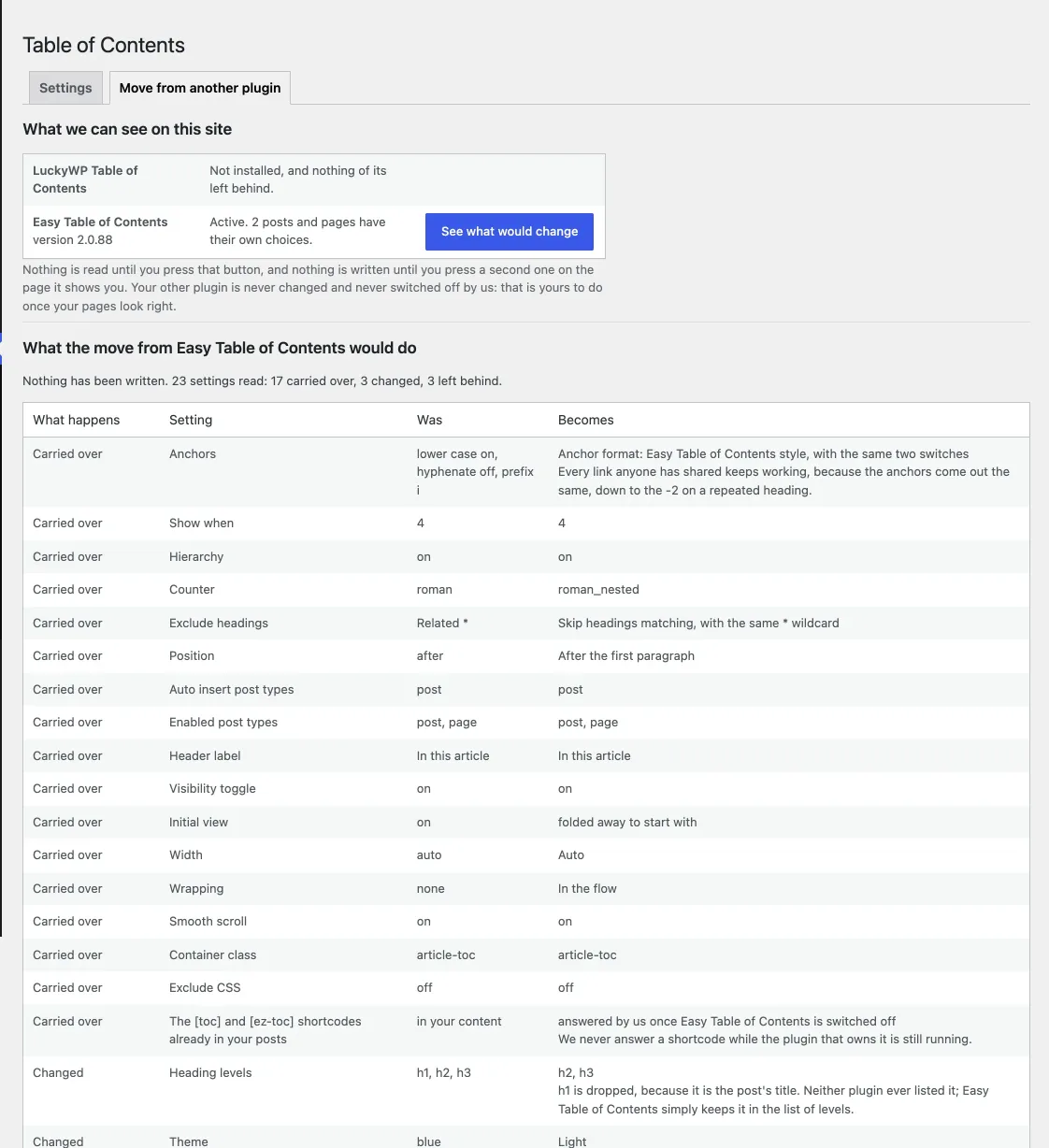
The report
The first button writes everything. Then switch Easy Table of Contents off yourself, from the Plugins screen. This plugin will not do that for you: it is your site, and the decision that the old plugin’s job is done should be yours.
Open your longest posts. Then find a link that points at a section of one of them, anywhere, and click it. It should land where it always did.
If something is not right
Put it back. The move tab has a button that restores the settings you had before.
Switch the old plugin back on. Its settings are exactly as they were; we never touched them.
Tell us. The support forum, which opens when the plugin is approved, answers within one working day, and a move that got something wrong is a bug worth fixing for the next person.
Questions people ask
Will my pages look different?
Two small ways. The box: if you had one of the colour themes, ours is a slightly different shade, and Box: None takes your theme’s colours instead, which is what we recommend. And the list itself is a real nested list here rather than a stack of divs, which a screen reader needs and which your theme may style slightly differently.
I use the sticky list. Is there one here?
Not in the free plugin. It is in the paid version. If the sticky list is the reason you use Easy Table of Contents, that is a fair reason to stay where you are, and we would rather you did than be disappointed.
What if I have LuckyWP Table of Contents as well?
The move tab shows both. Do LuckyWP first; a post with choices in both keeps LuckyWP’s.
Can I run the move twice?
Yes. It copies rather than merges, so running it again gives the same result.