Every grid and list has a name
When you save a product with a grid or list, the grid or list is saved with the product’s name: “Cadiz Blackout roller blind grid”, “Oak flooring price list”. The name shows under the editor as “Saved as: Cadiz Blackout roller blind grid”. That name is what other products see.
To rename it, click Rename next to the name, type the new one and update the product. Names are kept unique: if another grid already has the name, the editor says so and a number is added. Names can also be changed in one place, under WooCommerce, Settings, Products, Price grids and lists.
Using a grid or list on another product
On the second product’s Sold by tab, the Price grid (or Price list) drop-down lists every one in the shop, with how many products use it: “Cadiz Blackout roller blind grid (Used by 1 product)”. Pick one and its prices fill the editor.
Once two products use the same grid, the editor is read-only on both, with a line that says why: “Shared with 1 other product. Changes here change both.” and two ways out:
- Edit this grid frees the editor. When you update the product, a question asks “This grid is shared with other products. Save the changes for all of them?” Cancel keeps the page and your edits so you can choose the other way instead.
- Make a copy for this product gives this product its own copy to edit as it likes. The others keep the original.
The first option is for “our blackout prices went up”; the second is for “this one blind is different”.
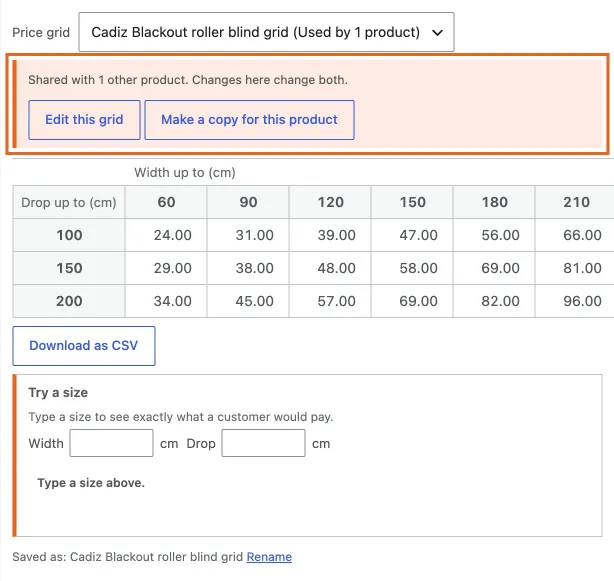
A grid another product uses is read-only, with two ways out.
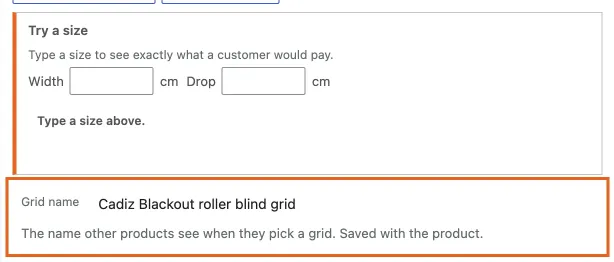
Rename a grid where its name is shown.
Starting a new grid
The first choice in the drop-down is Start a new grid for this product. It clears the editor; type or paste, and the grid is saved under the product’s name when you update.
Price grids and lists, in one place
WooCommerce, Settings, Products, Price grids and lists shows every grid and list in the shop: its name, whether it is a grid or a list, and what uses it, by name, products and categories both. Rename any of them there. One that nothing uses has a Delete link; one in use cannot be deleted, so nothing in the shop can lose its prices. Prices themselves are edited from any product or category that uses the grid or list.
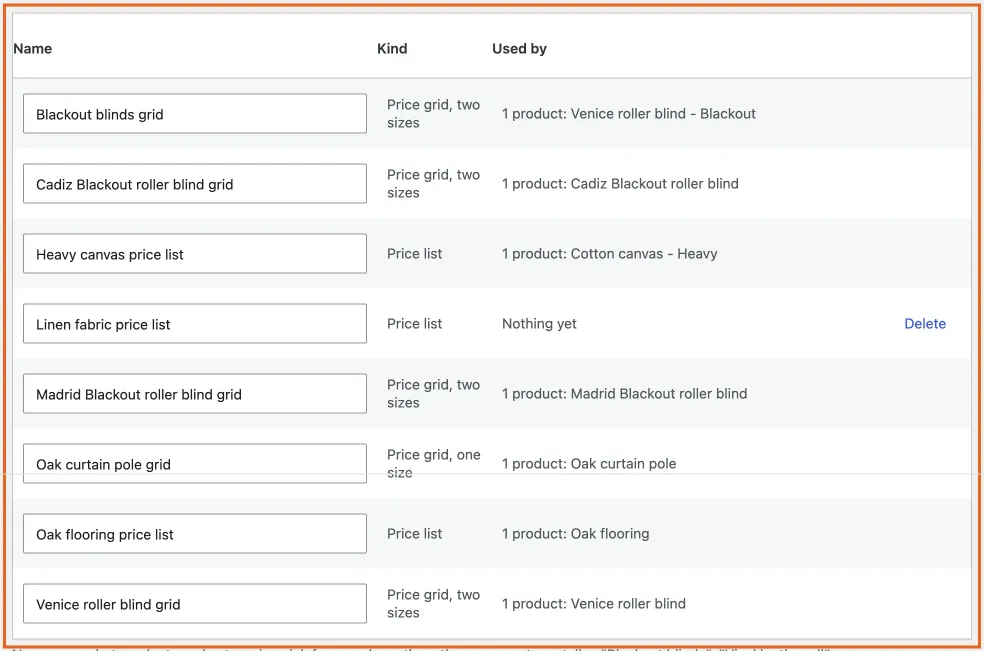
Every grid and list in one place.
What happens to prices
A made-to-measure product’s price is the lowest cell of its grid, so shop lists say “From £24.00”. When a shared grid is edited, every product that uses it gets its From price refreshed. Variations do too.